Truck and Trailer Inspection
Introduction
The "Truck and Trailer Inspection" document in the VSD Fleet Management System (VSD Fleet MS) is designed to help manage and track detailed inspections of trucks and trailers. It includes a wide range of checklists for various systems such as lighting, engine, brakes, fuel system, powertrain, electronics, and more. This document helps fleet managers ensure that all necessary inspections are conducted thoroughly and efficiently.
1. Accessing Truck and Trailer Inspection
To access the "Truck and Trailer Inspection" document:
Navigate to the VSD Fleet MS module within your system.
Locate the "Truck and Trailer Inspection" document under the appropriate section.
Open the document to view, add, or edit entries related to truck and trailer inspections.
2. Overview of Fields
Truck Inspection Information
This section collects key details about the truck and trailer inspection:
Expected Trip: Enter the trip details that are anticipated for the vehicle.
Inspection Date: The date on which the inspection is conducted.
Truck Driver: This field is auto-fetched from the linked trip.
Truck Plate No: Auto-fetched from the linked trip, this is the truck’s registration number.
Trailer No: Auto-fetched from the linked trip, this field stores the trailer number.
**Mileage:**Enter the truck's mileage at the time of inspection.
Truck Type: Select the type of truck being inspected.
Routine Checklist
This section tracks routine checklist items based on the trip:
Trip Reference: Link to the specific trip associated with this inspection.
System Checklists
Various sections are included to capture details of different truck systems being inspected. Each system section uses tables to record detailed inspection information:
Truck Lighting Checklist
Truck Lighting: Table for capturing information about lighting inspections.
Truck Engine Checklist
Truck Engine: Table for recording engine inspection details.
Brake System Checklist
Truck Brakes: Table for capturing brake system inspection details.
Truck Fuel System
Truck Fuel System: Table for fuel system inspections.
Truck Power Train
Truck Power Train: Table for powertrain system checks.
Electronics Checkings
Truck Electronics: Table for electronic system inspections.
Electrical Checkings
Truck Electrical Checklist: Table for electrical system checks.
Truck Steering Checklist
Truck Steering Checklist: Table for steering system inspection.
Truck Tire Checklist
Truck Tire Checklist: Table for tire inspections.
Truck Tires Checklist
Truck Tires Checklist: Table for additional tire inspections.
Truck Air System Check
Truck Air System: Table for inspecting the truck’s air system.
Truck Suspension Checklist
Truck Suspension Checklist: Table for suspension system checks.
Truck Status
This section contains information about the truck’s status:
Upload Respective Truck Image: Attach an image of the truck related to this inspection.
This screen typically includes fields for inspection date, inspector details, vehicle information, checklist items with pass/fail status, images of defects, and repair actions taken. This document serves as a crucial tool for maintaining fleet safety, compliance with regulatory standards, and preventive maintenance planning.
The Truck inspection details are recorded following a completed trip. Capturing essential details like the last trip reference, driver's name, truck and trailer identification numbers, inspection posting date, and the vehicle's current mileage. This information serves as a baseline for assessing vehicle performance, identifying potential issues, and scheduling necessary maintenance.
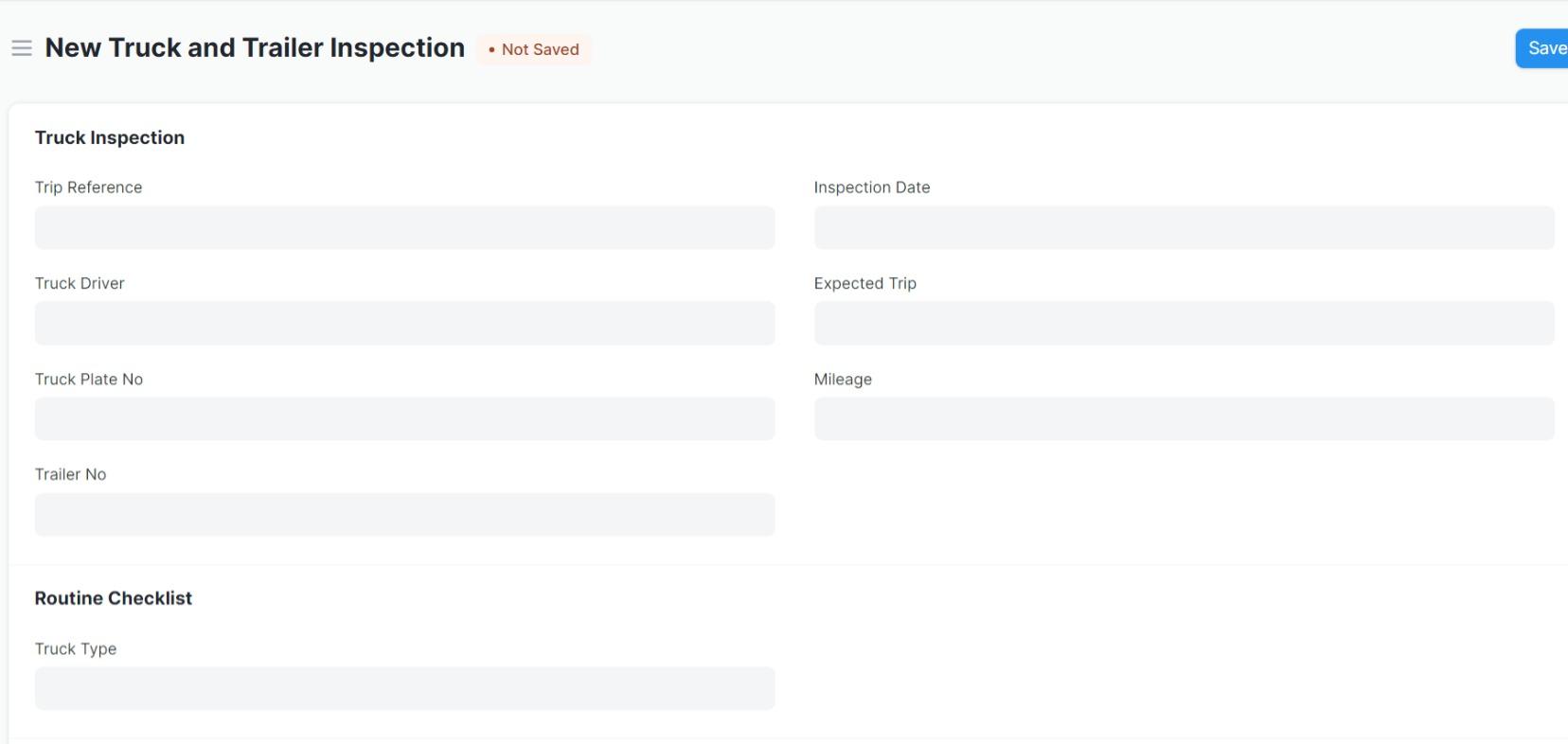
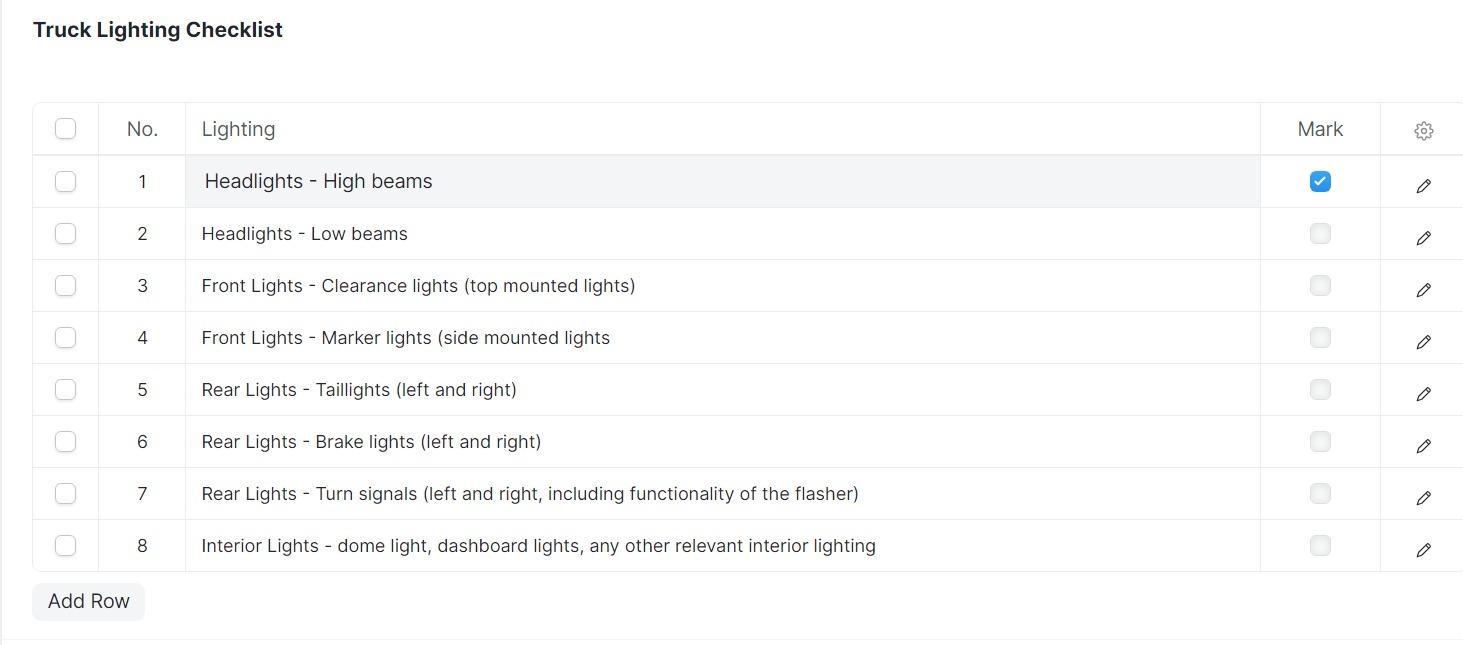
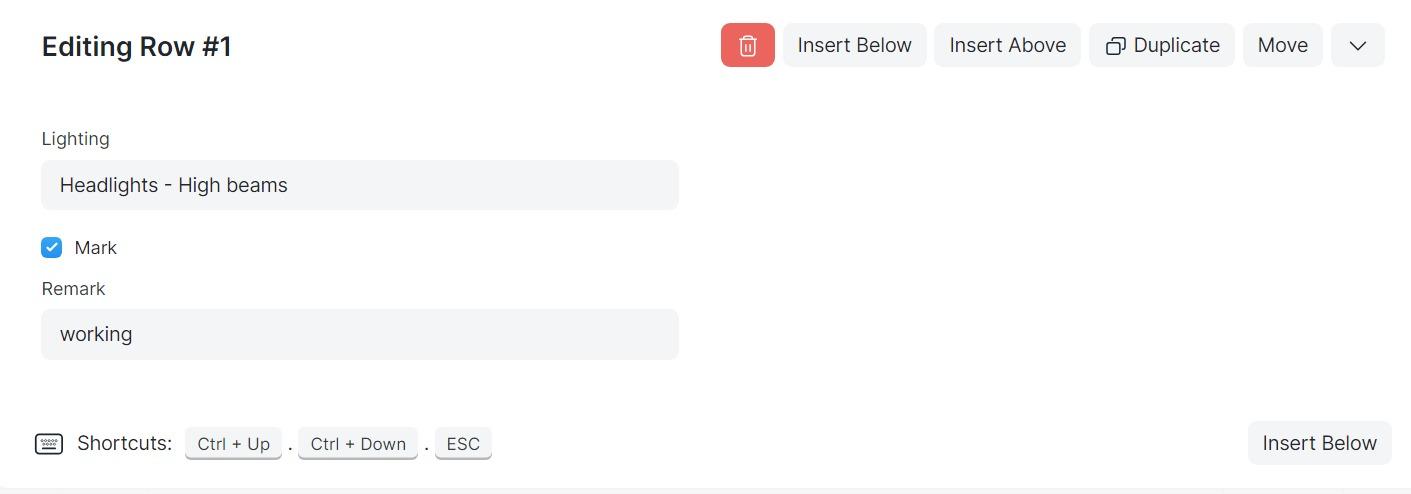 From the above The Truck and Trailer Inspection form detailing truck lighting checklist to ensure thorough assessment of vehicle illumination systems; this section allows users to systematically examine each lighting component.
For instance, under the "Lighting" category, inspectors can add rows to specify different headlight types, such as high beams, low beams, and fog lights.
A checkbox indicates whether the light has been checked or not.
And add remarks to document any issues or abnormalities detected.